Jamovi Data Exploration (Pareto Plot)

Mohamad's interest is in Programming (Mobile, Web, Database and Machine Learning). He is studying at the Center For Artificial Intelligence Technology (CAIT), Universiti Kebangsaan Malaysia (UKM).
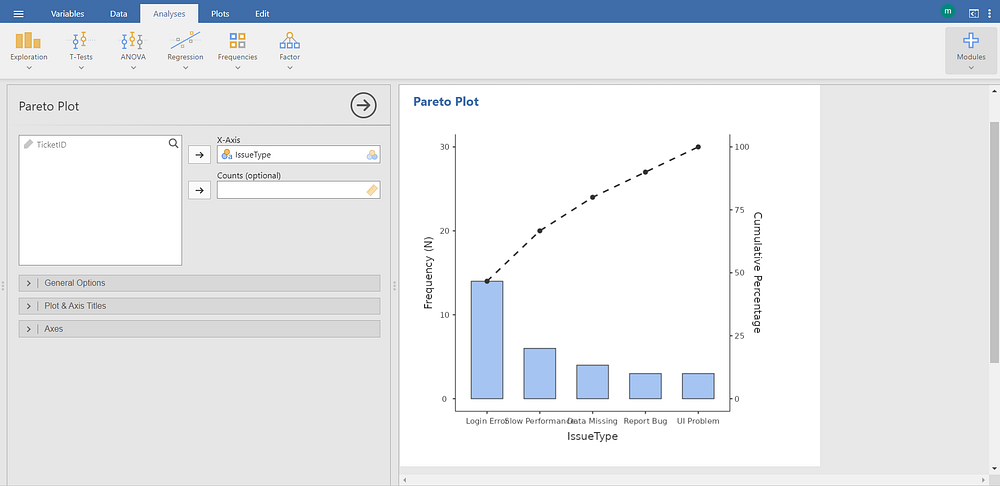
The screenshot displays the Pareto Plot module under the Exploration group in jamovi, a statistical software platform designed for data visualization and exploratory analysis.
In the left panel, variable assignments are configured:
The categorical variable IssueType is assigned to the X-Axis, indicating it represents the categories being analyzed (e.g., Login Error, Performance, Data Missing, etc.).
The Counts (optional) field is left blank, meaning the plot uses raw frequency counts derived directly from the dataset rather than pre-aggregated or weighted values.
No additional variables are selected for grouping or stratification.
Below these fields, collapsible sections labeled General Options, Plot & Axis Titles, and Axes are visible. These allow customization of the chart’s appearance, including titles, axis labels, scaling, and formatting.
In the right panel, under the Results heading, the generated Pareto plot is displayed. It combines:
A bar chart showing the absolute frequency (count) of each category on the left y-axis (labeled “Frequency (N)”).
A line graph showing the cumulative percentage of total occurrences on the right y-axis (labeled “Cumulative Percentage”).
The categories along the x-axis are sorted in descending order of frequency — from highest (Login Error) to lowest (UI Problem). This ordering follows the Pareto principle (80/20 rule), emphasizing the most significant contributors to the total.
The dashed line connecting the cumulative percentages visually highlights how quickly the total accumulates — for example, the first two categories (Login Error, ErrorFlow) may account for over 50% of all issues, while the remaining categories contribute incrementally smaller shares.
This visualization supports prioritization in quality control, process improvement, or resource allocation by identifying which few categories contribute to the majority of observed events. It is particularly useful in contexts such as customer support ticket analysis, defect tracking, or operational efficiency reviews.


