Jamovi Data Exploration (Scatter Plot)

Mohamad's interest is in Programming (Mobile, Web, Database and Machine Learning). He is studying at the Center For Artificial Intelligence Technology (CAIT), Universiti Kebangsaan Malaysia (UKM).
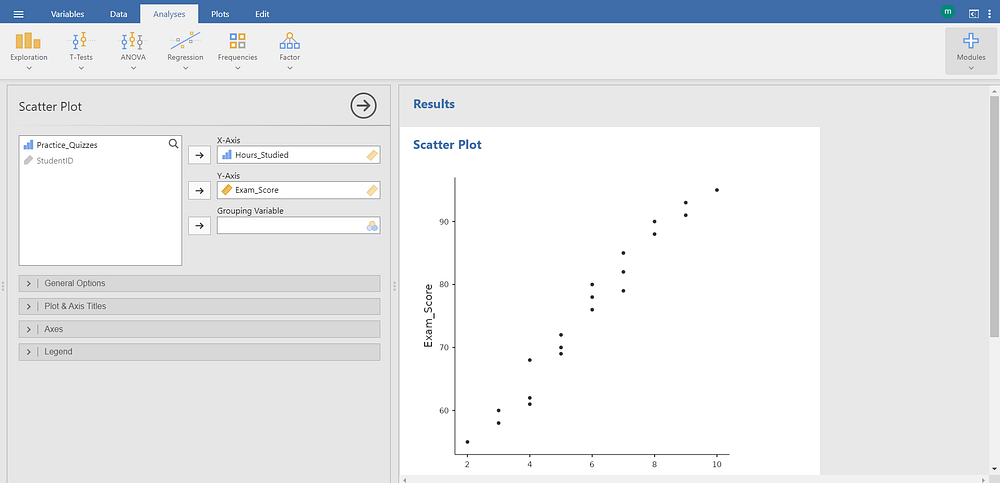
The screenshot displays the Scatter Plot module under the Exploration group in jamovi, a statistical software environment designed for visual data exploration.
In the left panel, variable assignments are configured:
The variable Hours_Studied is placed in the X-Axis field, indicating it serves as the horizontal axis variable.
The variable Exam_Score is placed in the Y-Axis field, indicating it serves as the vertical axis variable.
The Grouping Variable field remains empty, meaning no categorical variable is used to differentiate data points by color or shape.
Below these fields, collapsible sections labeled General Options, Plot & Axis Titles, Axes, and Legend are visible. These sections allow customization of plot appearance, including titles, axis scales, and legend formatting.
In the right panel, under the Results heading, the generated scatter plot is displayed. Each point represents an individual observation plotted according to its values for Hours_Studied (x-axis) and Exam_Score (y-axis). The pattern of points suggests a positive association: higher study hours generally correspond with higher exam scores. The relationship appears approximately linear, without obvious outliers or clusters.
A grouping variable is a categorical variable used to partition data into distinct subsets for comparative visualization or analysis.
Use grouping after inspecting the overall (ungrouped) scatter plot — to avoid premature focus on subgroup noise.
Pair grouped scatter plots with separate correlation coefficients or regression lines per group (enabled via Add regression line and Grouped options in jamovi’s General Options).
Ensure the grouping variable is correctly set as nominal or ordinal in the data spreadsheet (indicated by the “A” icon in jamovi), not continuous.


